
Partitioning and Clustering Tables for Performance Optimization in BigQuery

BigQuery, Google’s serverless, highly scalable, and cost-effective multi-cloud data warehouse, is designed for large-scale data analytics. As datasets grow, query performance can degrade, and costs can increase due to the volume of data scanned. To address these challenges, BigQuery offers powerful optimization techniques: partitioning and clustering. These features allow for more efficient data management, reduced query costs, and significantly improved query performance.
In this article, we will delve (yes, I said it again, lol) into the concepts of partitioning and clustering, explore their benefits, and provide practical examples to help you implement these techniques in your BigQuery projects.
What is Partitioning?
Partitioning involves dividing a large table into smaller, more manageable segments called partitions. Each partition contains a subset of the table’s data, allowing queries to scan only the relevant partitions rather than the entire table. This can lead to faster query performance and reduced costs.
Benefits of Partitioning:
Improved Query Performance: Queries that filter on partition keys can run faster by scanning only the necessary partitions.
Cost Reduction: Since BigQuery charges based on the amount of data processed, partitioning can reduce costs by minimizing the data scanned.
Easier Data Management: Partitioning facilitates easier management and maintenance of large datasets, allowing data to be added, removed, or archived by partition.
Types of Partitioning in BigQuery:
Ingestion-time Partitioning: Ingestion-time partitioning automatically partitions data based on the time it was ingested into BigQuery. This is particularly useful for streaming data or log data that is continuously ingested.
Date/Time Partitioning: Date/time partitioning allows you to partition a table based on a DATE, TIMESTAMP, or DATETIME column. This is ideal for time-series data.
Integer Range Partitioning: Integer range partitioning partitions a table based on an integer column, useful for data naturally divided by numerical ranges, such as user IDs or product IDs.
See details on how to create an Integer-Range Partitioned Table
Creating and Using Partitioned Tables
To create a partitioned table, you need to specify the partitioning method and the column to use as the partition key. Here’s an example of creating a date-partitioned table and querying it effectively:
CREATE TABLE my_dataset.sales
PARTITION BY DATE(transaction_date)
AS
SELECT
  transaction_id,
  customer_id,
  transaction_date,
  amount
FROM
  source_table;
Querying the partitioned table:
SELECT
  customer_id,
  SUM(amount) AS total_amount
FROM
  my_dataset.sales
WHERE
  DATE(transaction_date) BETWEEN '2023-01-01' AND '2023-01-31'
GROUP BY
  customer_id;
This query scans only the partitions that fall within the specified date range, resulting in faster execution and lower cost.
What is Clustering?
Clustering in BigQuery involves organizing data within each partition based on the values of one or more columns. Clustering can significantly enhance query performance by reducing the amount of data scanned within partitions.
Benefits of Clustering:
Improved Query Performance: Clustering helps improve query performance by allowing BigQuery to skip over irrelevant data blocks.
Efficient Data Organization: Clustering organizes data in a way that optimizes the retrieval of related data.
How Clustering Works in BigQuery
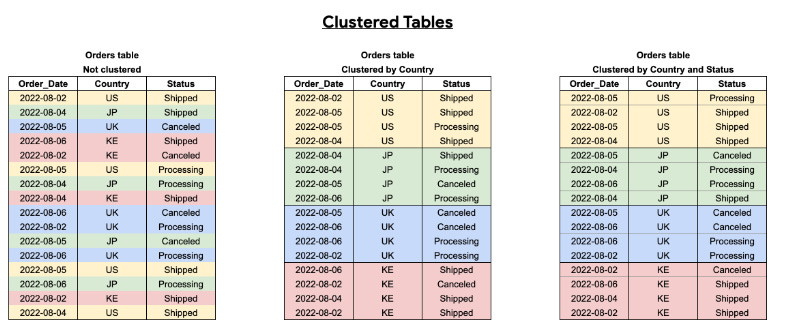
When a table is clustered, BigQuery automatically sorts the data within each partition based on the clustering columns. This sorting helps speed up queries that filter or aggregate data based on the clustering columns.
Creating and Using Clustered Tables
To create a clustered table, you need to specify the clustering columns. Clustering can be combined with partitioning for maximum efficiency. Here’s an example of creating a partitioned and clustered table:
CREATE TABLE my_dataset.sales
PARTITION BY DATE(transaction_date)
CLUSTER BY customer_id, product_id
AS
SELECT
  transaction_id,
  customer_id,
  product_id,
  transaction_date,
  amount
FROM
  source_table;
Querying the partitioned and clustered table:
SELECT
  customer_id,
  product_id,
  SUM(amount) AS total_amount
FROM
  my_dataset.sales
WHERE
  DATE(transaction_date) BETWEEN '2023-01-01' AND '2023-01-31'
  AND customer_id = 'C12345'
GROUP BY
  customer_id,
  product_id;
When to use clustering
Clustering addresses how a table is stored so it's generally a good first option for improving query performance. You should therefore always consider clustering given the following advantages it provides:
Unpartitioned tables larger than 64 MB are likely to benefit from clustering. Similarly, table partitions larger than 64 MB are also likely to benefit from clustering. Clustering smaller tables or partitions is possible, but the performance improvement is usually negligible.
If your queries commonly filter on particular columns, clustering accelerates queries because the query only scans the blocks that match the filter.
If your queries filter on columns that have many distinct values (high cardinality), clustering accelerates these queries by providing BigQuery with detailed metadata for where to get input data.
Clustering enables your table's underlying storage blocks to be adaptively sized based on the size of the table.
Combining clustered and partitioned tables
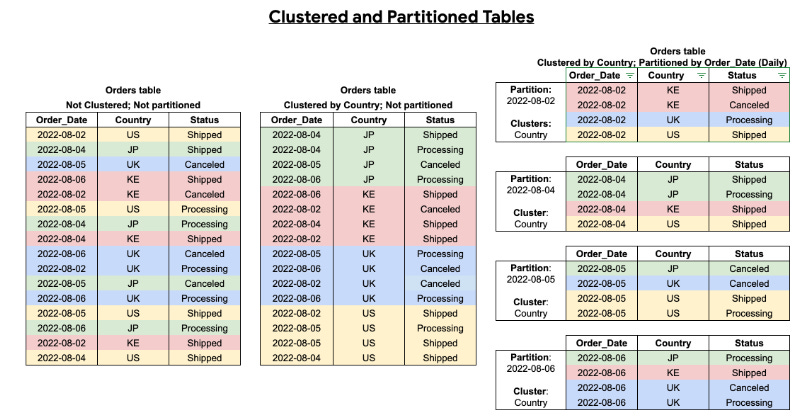
You can enhance query optimization by combining table partitioning with table clustering, achieving finely grained sorting.
A clustered table sorts data within clustered columns based on user-defined properties. The data in these columns is organized into storage blocks that are adaptively sized according to the table's size. When a query filters by the clustered column, BigQuery scans only the relevant blocks rather than the entire table or partition. In this combined approach, data is first segmented into partitions and then clustered within each partition based on the clustering columns.
Creating a table with both partitioning and clustering allows for more precise sorting, as illustrated in the following diagram:
Best Practices for Partitioning and Clustering
Choose the Right Partitioning Key: Select a partitioning key that reflects how your data is most commonly queried. For time-series data, a date or timestamp column is usually a good choice.
Combine Partitioning and Clustering: Use clustering within partitions to further optimize query performance. This combination is powerful for large datasets.
Monitor and Adjust: Regularly monitor query performance and adjust partitioning and clustering strategies as needed. Use BigQuery’s query execution details to identify areas for improvement.
Avoid Over-Partitioning: Too many partitions can lead to inefficiencies. Aim for a balance that minimizes the number of partitions while still improving performance.
Conclusion
Partitioning and clustering are powerful techniques for optimizing query performance and managing costs in BigQuery. By carefully selecting partitioning keys and clustering columns, you can significantly improve the efficiency of your data analysis processes. Remember to monitor your queries and adjust your strategies as your data and query patterns evolve.
For further learning, explore BigQuery’s documentation and experiment with different partitioning and clustering configurations on your datasets.